

Key Takeaway
Vishing is prevalent and burdening helpdesks, businesses, and individuals. AI voice phishing bypasses traditional helpdesk verification, making identity–not voice, the new foundation of security. Traceless stops impersonation by enforcing digital identity verification before any sensitive workflow can proceed.
The Rise of AI-enhanced Voice Phishing Against Helpdesks
Helpdesks have become one of the highest-value targets for cybercriminals (Recent attacks at Google and Cisco). Why? Voice AI is successfully impersonating people to reset account information, override MFA, and modify permissions. This evolution has created a new category of attack, Vishing.
AI Voice Phishing (Vishing + Deepfake AI = Scale)
Vishing is a cyberattack where an adversary uses AI-generated or cloned voices to impersonate a trusted individual and manipulate helpdesk agents or automated Voice AI systems into performing unauthorized actions.
A wide range of organizations including MSPs, SaaS companies, and internal helpdesks are all experiencing a dramatic rise in impersonation attempts, fraudulent ticket requests, social engineering, and deepfake executive voice attacks. Meanwhile, traditional controls like security training, callback verification, and voice recognition, are not effective.
How Do Cyber Criminals Collect Voice Samples and Infiltrate a Helpdesk?
Step 1: Voice Clone
Hackers gather audio from YouTube, webinars, podcasts, voicemail greetings, social media posts, conference recordings needing only 5–10 seconds to clone a voice convincingly.
Step 2: Research Helpdesk Processes
Attackers often identify an insecure workflow whether they are password reset flow, verification questions, ITSM workflows (ServiceNow, Zendesk, ConnectWise, etc.), or Internal escalation paths.
Step 3: Execute the Voice Attack
They call the helpdesk using the cloned voice to request:
- MFA reset
- Password change
- New device enrollment
- Privilege escalation
- HR, finance, or IT updates
Step 4: Complete Account Takeover
If successful, the attacker gains authenticated access and moves inside the environment.
How to Prevent Vishing with Traceless
What Is Traceless?
Think of Traceless as AI cybersecurity for human communication. Traceless prevents vishing, AI phishing, impersonation, and social engineering attacks by verifying people’s identities in real time. The platform secures identity verification, file transfers, and workflows to eliminate impersonation attacks before sensitive actions occur.
Traceless protects common workflows like:
- Password resets
- MFA bypasses
- Access changes
- Secure secrets sharing
- IT service requests
- Cross-team communication
- Account unlock
- Privilege escalation
- Device enrollment
- System modification
It integrates directly into tools your teams already use:
- Autotask
- ConnectWise
- Duo
- HaloPSA
- Jira Service Desk
- Microsoft Authenticator
- Microsoft Teams
- Okta
- ServiceNow
- Slack
- Zendesk
How Traceless Solves the Voice AI Phishing Problem
Here is the key security principle:
AI can mimic a voice.
AI cannot mimic a verified cryptographic identity.
Traceless enforces identity verification outside the voice channel, meaning a cloned voice can’t complete the workflow and helpdesk agents don’t need to “guess”. Traceless neutralizes voice-based impersonation attacks by removing the voice channel from identity verification entirely.
Traceless replaces voice trust with verified digital identity using:
- MFA
- Identity providers (Okta, Duo, Azure AD, Google)
- Biometric verification
- Temporary, one-time access approvals
- Secure ephemeral links
The Key
Identity Verification Layer (IVL) Outside the Voice Channel
Instead of trusting caller ID, voice, knowledge-based answers, callback requests, or ticket notes, with Traceless the helpdesk workflow pauses until the requester proves their identity. This instantly breaks the vishing attack chain. Teams using Traceless as a best practice are protected whether it is human error, social engineering pressure, process gaps, or "the CEO called me" urgency traps.
Start Your 2 Week Trial with Traceless
Vishing Scenarios
How Traceless Stops Helpdesk Voice AI Attacks
How Traceless Prevents Managed Service Provider (MSP) Voice AI Attacks?
The Attack Attempt:
An attacker clones the voice of a CFO from a public earnings call.
They call the MSP’s helpdesk:
“Hi, this is Robert Hale, (CFO of a business).
I’m locked out of my account and I need you to reset my MFA ASAP. We’re about to join a board meeting.”
Without protection, many helpdesk agents would comply under this circumstance.
How Traceless Stops It:
The agent triggers a Traceless verification request and the attacker cannot pass the identity challenge because they are not the CFO.
How Traceless Prevents Enterprise IT & Cybersecurity Voice AI Attacks?
The Attack Attempt:
An attacker clones the voice of a manufacturing plant manager.
They call the internal helpdesk claiming:
“We’re losing production. I need admin access to the maintenance control system now.”
How Traceless Stops It:
- Traceless requires identity verification before granting admin access. Attacker cannot authenticate.
- Workflow ends without escalation.
How Traceless Prevents SaaS Voice AI Attacks?
The Attack Attempt:
A threat actor interacts with the company’s Voice AI bot, impersonating a user and requesting:
- Password reset
- Subscription change
- Billing information access
The bot alone cannot determine real identity.
How Traceless Stops It:
- The Voice AI bot sends a Traceless identity verification link.
- User must authenticate through their identity provider.
How Traceless Prevents Internal Corporate Helpdesk Attacks?
The Attack Attempt:
An employee’s voice is cloned from TikTok videos.
The attacker calls IT:
“Hey, it’s Sarah from Marketing. I dropped my phone and lost my authenticator app. Can you help me get back into my email?”
How Traceless Stops It:
- Helpdesk sends a Traceless verification challenge.
- The attacker drops the call because they cannot authenticate.
- Attackers cannot bypass MFA via voice impersonation.
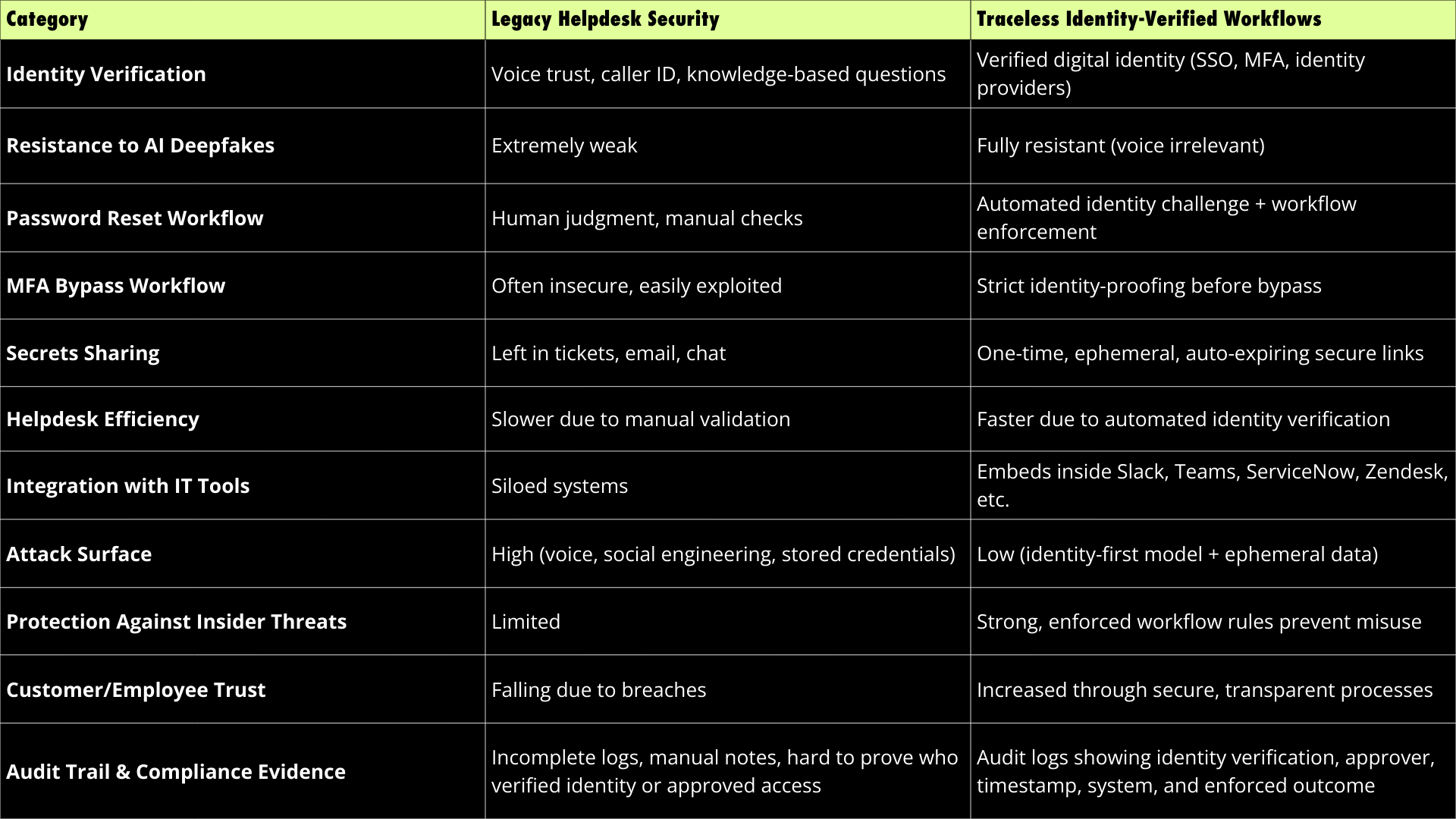
TABLE COMPARISON
Legacy Helpdesk Security vs Traceless Identity-Verified Workflows
Voice cannot be trusted. Identity can.
Traceless shifts helpdesk security from subjective human judgment to objective, cryptographically verified identity proofing. By enforcing identity across every sensitive workflow, you eliminate impersonation attacks human or AI and restore trust to your service operations.
1. Why is identity verification better than voice authentication?
Voice can be faked, manipulated, or stolen. Digital identity via SSO, MFA, or identity providers cannot be impersonated through AI alone. Identity-based workflows remove subjective decision-making from helpdesk teams.
2. Does Traceless slow down helpdesk operations?
No. Traceless streamlines workflows by automating identity verification. Instead of agents asking manual verification questions, they trigger a secure identity challenge that completes quickly and reliably.
3. How does Traceless integrate with existing tools?
Traceless embeds directly into systems like Slack, Teams, ServiceNow, Zendesk, ConnectWise, and HaloPSA. There is no need to change your ticketing system or retrain entire teams.
4. Who benefits the most from Traceless?
Organizations with sensitive identity workflows including MSPs, enterprise IT teams, internal helpdesks, and Voice AI SaaS companies all see immediate security and operational improvements.
5. Can Traceless help prevent MFA bypass attacks?
Absolutely. Traceless enforces identity proofing before any MFA reset or bypass can occur, eliminating one of the most common impersonation attack vectors in helpdesk environments.