
Key Takeaway
Chat-based support without identity verification creates a major security gap. Traceless integrates directly into Slack & Microsoft Teams workflows bringing identity verification and DLP directly into ChatOps.
Why Identity Verification in Chat Matters
Modern IT support doesn’t just live in a ticketing portal anymore. It lives in chat.
A “quick ask” in Slack or Microsoft Teams is now the fastest path to access, resets, approvals, and fixes. That speed is great for productivity but it’s also exactly why attackers target chat channels.
So when a message pops up saying “Hey, can you reset my password?”, the real question becomes:
Who’s actually behind that message?
Common Chat Hack Scenarios
Attackers don’t need malware if they can just ask nicely. Below are various real-world scenarios:
A compromised Slack session used to request system access
A spoofed Teams account asking finance for “urgent” data
An MSP receiving client credentials via chat (and unknowingly storing them)
Chat feels informal. Hackers can social engineer and exploit that informality. Bottomline, ChatOps without identity verification is a security blind spot. More real-world examples.
Slack vs. Teams: Which Is More Secure?
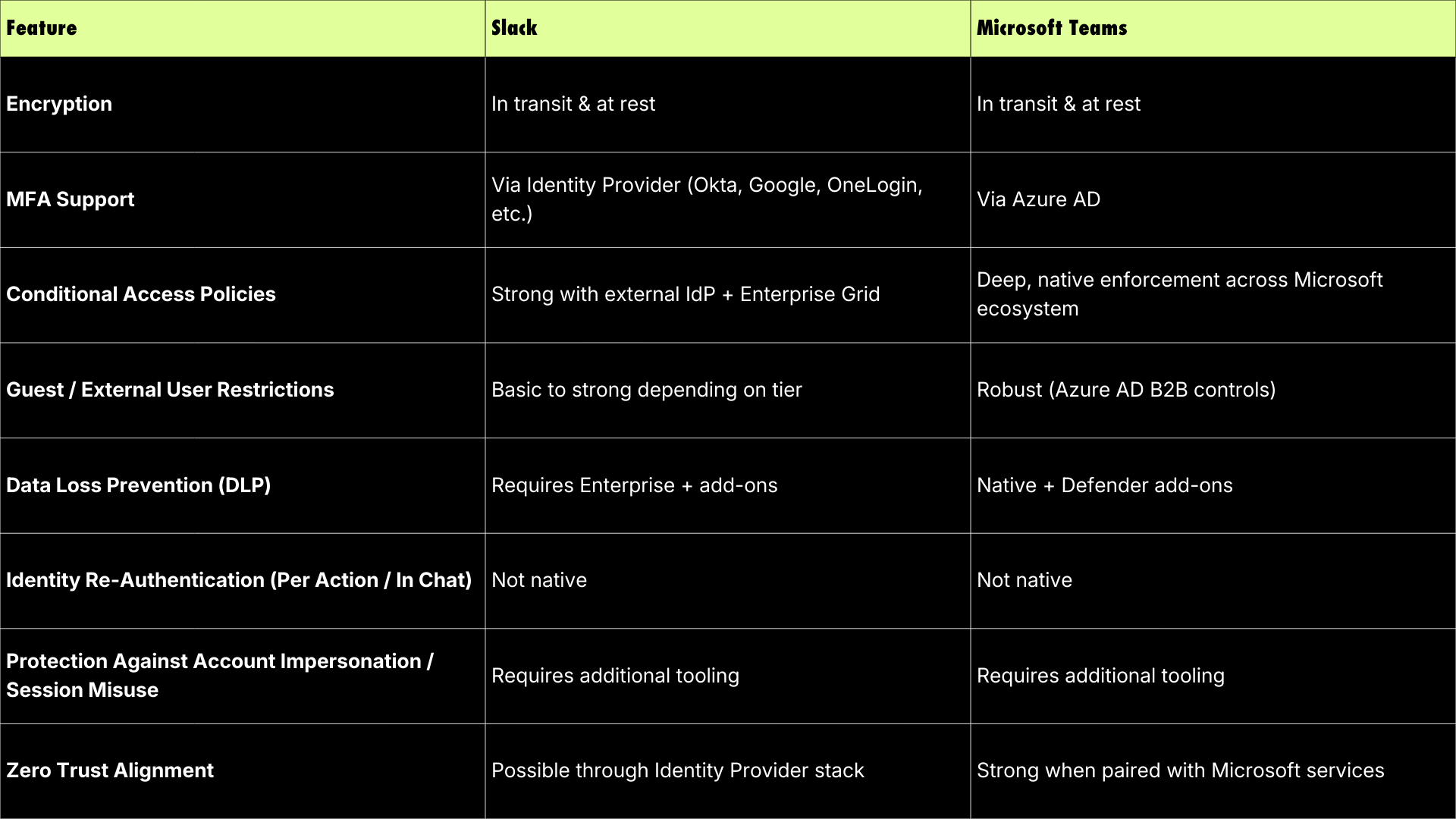
This is one of the most common buyer questions and the honest answer is neither. Slack nor Teams is inherently “secure enough” for identity verification on its own. Neither verifies the person making the request.
The Real Risk: Impersonation Inside Chat
Here’s how chat-based attacks usually succeed:
Step 1: An attacker compromises an account or session
Step 2: They send a legitimate-looking request in Slack or Teams
Step 3: Support responds
Step 4: No secondary verification happens
Step 5: Access is granted or data is shared
The Compliance Trap Lurking in Chat
Another buyer concern: compliance risk. Many organizations accidentally:
- Store credentials in chat history
- Share sensitive files in Teams channels
- Retain regulated data indefinitely
These problems conflict with SOC 2, HIPAA, FINRA, and GDPR regulations.
No malware. No phishing email. Just trust. But how can you really trust who’s behind that message? Companies around the world are using Traceless to combat this critical issue.
Extending Identity Verification Into Slack & Teams with Traceless
This is where Traceless changes the workflow, without slowing it down.
Sample scenario: Password Reset in Teams
User: “Hey IT, can you reset my password?”
- Agent clicks Verify Identity (inside Slack or Teams)
- Traceless sends a secure verification prompt in chat
- User confirms identity via approved factors
- Agent proceeds, confident it’s the real employee
The Key
Benefits
Traceless integrates directly into Slack and Teams so verification happens:
- Where the conversation already is
- Without forcing users into new tools
- Without storing unnecessary sensitive data
Key Chat-Based Use Cases
- Password resets
- Access approvals
- HR/Financial approvals
- MFA resets
- Privileged requests
- MSP client verification
Start Your 2 Week Trial with Traceless
See how identity verification works directly inside Slack and TeamsTraceless DLP: Find and Eliminate Chat-Based Risk
Chat isn’t just an identity problem, it’s a data problem.
How Traceless Helps:
- Ephemeral secure prompts instead of stored secrets
- No sensitive data lingering in chat logs
- Audit-friendly verification trails
- Policy-aligned communication by default
Advanced DLP Capabilities
- Detects sensitive data wherever it appears
- Flags risky sharing in Slack & Teams
- Prevents data leaks before they happen
- Reduces human error in fast-moving conversations
- Identity + DLP together = real ChatOpsecurity.
1. Is Slack more secure than Microsoft Teams?
Neither platform verifies user identity inside chat. Both require external controls for secure verification.
2. Can attackers really impersonate users in chat?
Yes, through compromised sessions, reused credentials, or social engineering.
3. Does identity verification slow down IT support?
Not with in-chat workflows. Traceless verifies identity without users leaving Slack or Teams.
4. How does this help with compliance?
Sensitive data isn’t stored in chat history, reducing audit and retention risk.
5. Is this useful for MSPs?
Especially. MSPs handle high-risk requests from multiple clients—chat verification is critical.
Chat is now the front door to IT. If you don’t verify who’s knocking, eventually someone you don’t trust will walk in.