
Healthcare Needs a New Standard for Trust
Healthcare organizations face a unique combination of pressures. Patient outcomes depend on IT system availability. Regulatory exposure and breach costs remain among the highest in any industry. A 2024 study by Proofpoint and the Ponemon Institute found that 28% of hospitals hit by a cyberattack reported increased patient mortality, up from 22% in 2023. IBM's Cost of a Data Breach Report found that the average healthcare breach cost $9.77 million per incident in 2024. That is the highest of any sector for the fourteenth consecutive year.
At the same time, the nature of identity-based attacks is shifting. Impersonation, social engineering, and AI-enabled voice cloning increasingly target help desks, account recovery workflows, and temporary access requests. In that environment, healthcare organizations need identity verification methods that are both stronger and less disruptive than what they have today.
This is where Microsoft Entra Verified ID fits. Healthcare needs more than strong logins. It needs a reliable way to confirm that the person requesting access, moving between facilities, or presenting a professional claim is who they say they are. Verified ID is a managed verifiable credential service that lets trusted organizations issue digital credentials that people can store and present when needed. It is not about getting someone through a sign-in screen. It is about proving trusted facts about a person, including their identity, their employment, and their certifications, in situations where getting it wrong carries real consequences.
This article explains what Verified ID is, how it works, and why healthcare is one of the strongest use cases for this technology.
What is Microsoft Entra Verified ID?
Microsoft Entra Verified ID is Microsoft's managed verifiable credential service. It is built on open standards, including the W3C Verifiable Credentials specification and decentralized identity concepts. It provides a structured way for organizations to issue, manage, and verify digital credentials.
The core model is simple. A trusted organization, such as a hospital, university, or licensing body, confirms information about a person and issues a signed digital credential. That person stores the credential in a secure digital wallet on their device. Later, when another organization needs proof of a claim (identity, employment status, professional certification, or training completion), the person presents the credential directly. The verifier does not need to contact the issuer.
The service is designed to be privacy-conscious and user-controlled. Individuals decide when and with whom to share their credentials. Organizations that verify those credentials can trust the cryptographic signatures without needing to access a centralized database or rely on manual verification.
Before getting into healthcare-specific use cases, it helps to understand the three-step process that makes this possible.
How Verified ID Works
Verified ID operates through a three-stage process involving three distinct roles: the issuer, the holder, and the verifier.
Stage 1: Issue. A trusted organization confirms information about a person and creates a digitally signed credential. In healthcare, this might be a hospital confirming a clinician's employment, a licensing board confirming a medical certification, or an HR department confirming that a new hire has completed background verification.
Stage 2: Store. The individual receives the credential and stores it in a digital wallet on their phone or device. The credential stays with the person, not locked inside the issuing organization's systems.
Stage 3: Present. When the individual needs to prove a claim, they present the credential to a verifier. The verifier checks the cryptographic signature to confirm the credential is authentic and has not been tampered with. No phone call to HR. No manual document review. No waiting for a third party to respond.
This model means that a credential issued once can be presented many times, to many different verifiers, without repeating the original verification process. For healthcare organizations dealing with high staff mobility and time-sensitive access decisions, that efficiency matters.
How Verified ID Works
1
Issue
A trusted organization confirms information and creates a signed digital credential.
ISSUER
2
Store
The individual stores the credential in a secure digital wallet on their device.
HOLDER
3
Present
The individual presents the credential when another party needs proof of a claim.
VERIFIER
Built on W3C verifiable credentials and decentralized identity standards.
Microsoft Verified ID and Traceless
The two platforms do not replace each other, instead they work together within different layers in a business' security stack. Learn how to setup Microsoft Verified ID and Traceless.
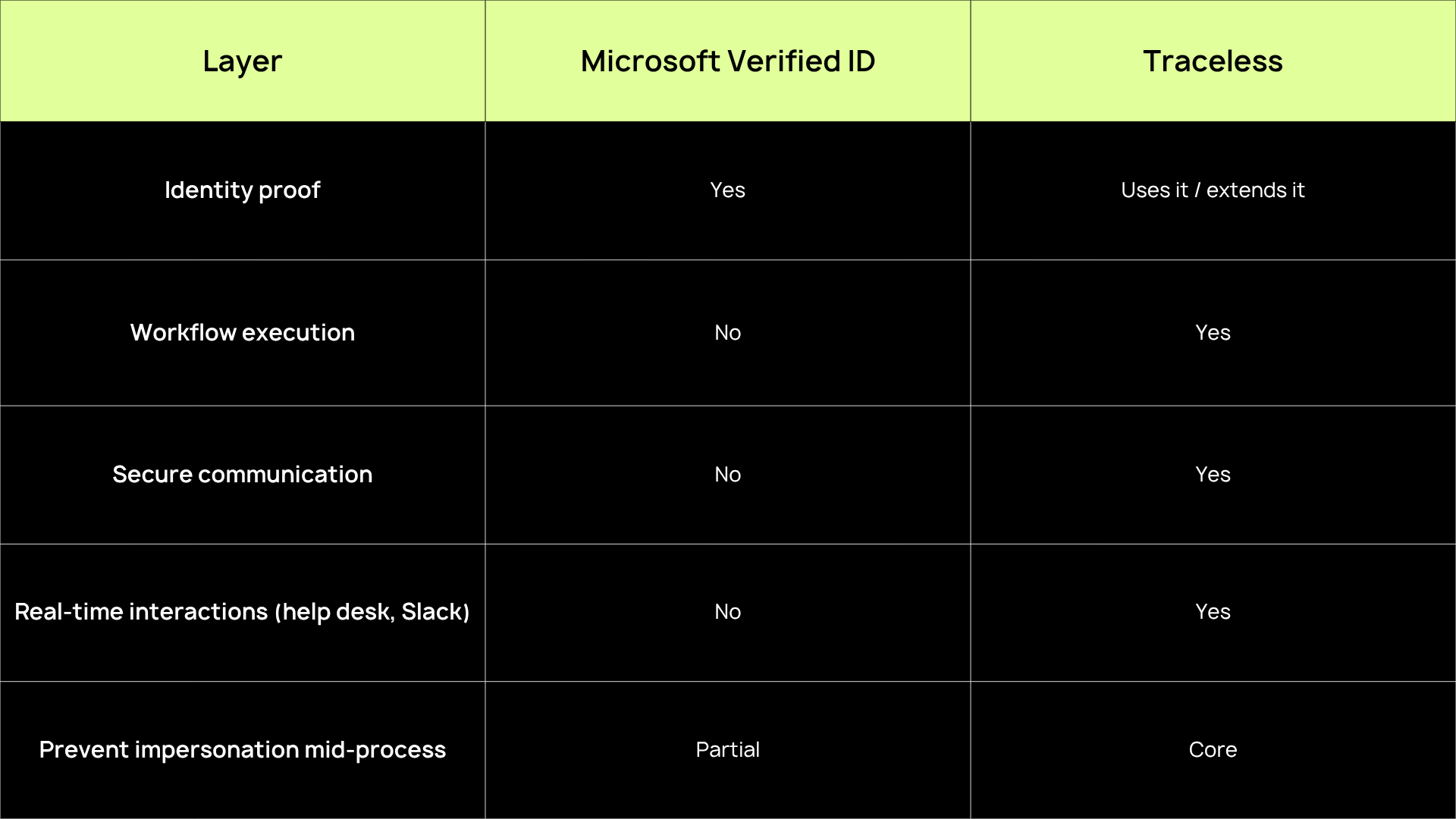
Traceless protects PHI data and sensitive communications
As work becomes more remote and conversational, attackers become more convincing.
Why Healthcare Is a Strong Fit
Healthcare is full of time-sensitive trust decisions. Clinicians move between sites. Contractors need temporary access. Onboarding must happen quickly. Staff may need to prove training or certifications across systems that do not share data cleanly. Every delay in verifying a person's identity or qualifications has a downstream effect on staffing, patient care timelines, and operational continuity.
The NHS provides one of the clearest real-world proof points. Staff moving across more than 200 separate hospital organizations faced significant delays from fragmented systems and manual credential processing. According to Microsoft's Verified ID whitepaper, implementing Verified ID allowed NHS staff to present credentials from their phones and prove medical certifications in minutes rather than waiting days. That kind of acceleration is not just an IT improvement. It is an operational resilience improvement that directly supports continuity of care.
NHS Staff Verification
Before and after Verified ID
What it does not replace
- 200+ separate hospital
- Manual credential processing
- Fragmented systems, no shared data
- Verification took days per clinician
- Staffing delays affected patient care
Days to Verify
After
- Credentials stored on staff phones
- Instant presentation to any verifier
- Medical certs verified digitally
- Cross-org trust established in minutes
- Reduced staffing delays
Minutes to verify
Beyond speed, healthcare organizations face a particular vulnerability at the help desk and in support workflows. Attackers increasingly target these human interaction points because they rely on trust judgments that are difficult to standardize. Social engineering, voice impersonation, and AI-enabled deepfakes make it harder for support staff to confirm identity through traditional phone-based methods. Verified ID addresses this by shifting identity verification from human judgment to cryptographic proof.
The result is a tool that balances security with speed. It provides strong verification without creating the kind of friction that disrupts care delivery, staffing workflows, or emergency access. For healthcare decision-makers, the value is not just technical. It is risk reduction, operational resilience, and a more defensible identity verification process in a sector where trust failures carry serious consequences.
Use Case: Staff Onboarding and Credential Verification
Hospitals and clinics regularly need to confirm that a new employee, traveling clinician, or contractor has the right credentials before granting system access or allowing them to begin work. In practice, this often involves manual verification of licenses, certifications, employment history, and background checks. These processes can take days and create bottlenecks during periods of high staffing demand.
Verified ID can streamline this process significantly. A new hire's credentials, issued and signed by a trusted authority, can be presented digitally during the onboarding flow. This includes remote onboarding scenarios. The verifying organization confirms the credential's authenticity instantly, without needing to contact the issuer or wait for manual document review.
For healthcare organizations that face both staffing pressure and compliance pressure at the same time, this matters. Faster onboarding does not mean weaker verification. It means that the verification happens through a cryptographic trust model rather than a slow, manual one. Staff can begin work sooner, and the organization has a stronger, auditable record of the verification that took place.
Use Case: Clinician Mobility Across Sites and Systems
Large healthcare systems and multi-site organizations face a recurring challenge. Clinicians need to move quickly between locations, but their documentation and credentials are often siloed across different organizations with different systems. Each time a clinician arrives at a new site, the verification process may start from scratch. That means duplicated effort, wasted time, and delayed access to the systems and facilities they need.
Verified ID addresses this directly. A clinician who holds a verified credential on their phone can present it at any participating facility. The verifier confirms the credential's authenticity in real time, without callbacks, faxes, or manual lookups. One credential, issued once, presented wherever it is needed.
In healthcare, faster verification is not just a convenience improvement. It affects staffing responsiveness and, ultimately, patient care timelines. When a traveling nurse or locum physician can be verified and granted access in minutes rather than days, the organization gains both speed and confidence. The NHS deployment demonstrated exactly this kind of improvement at scale across more than 200 hospital organizations.
Use Case: Help Desk Identity Checks and Account Recovery
The help desk is one of the most important, and most vulnerable, trust boundaries in any healthcare organization. When someone contacts support to request a password reset, temporary access, or an account update, the support team must make a real-time identity judgment. Traditionally, that judgment relies on knowledge-based verification: security questions, employee IDs, or manager callbacks. These methods are increasingly inadequate.
The threat landscape has shifted. Many of the most damaging healthcare breaches now stem not from technical exploitation but from social engineering. Attackers impersonate legitimate employees to gain access through support channels. The rise of AI-enabled voice cloning and deepfake audio has made these attacks significantly more convincing. A caller who sounds exactly like a known employee, provides an employee ID, and describes a plausible access scenario can be nearly impossible to distinguish from the real person using traditional verification alone.
Microsoft explicitly ties Verified ID to these scenarios. In a help desk context, Verified ID allows the support team to request a credential presentation before processing a sensitive request. Instead of relying on what someone knows (which can be stolen or guessed), the process relies on what someone can cryptographically prove. The individual presents a verified credential from their device, and the system confirms its authenticity before the request proceeds.
For healthcare organizations, where impersonation at the help desk can expose patient records, clinical systems, and protected health information, this shift from knowledge-based to cryptographic verification is a meaningful improvement. It strengthens one of the most targeted entry points in the organization.
The Help Desk:
A High-Risk Trust Boundary
Evolving Treats
- Social Engineering: Impersonation via phone, email, or chat
- Voice Cloning: AI audio mimicking real employees
- Deepfake Video: Real-time visual impersonation
- Credential Theft: Stolen passwords are not identity proof
Verified ID Response
- Cryptographic proof: Credentials are signed and tamper-evident
- Phone-based Verification: Staff present from their own device
- Real-Time Validation: Verifier confirms claims instantly
- Trust Re-establishment: Recovery requires proof, not just knowledge
Use Case: Contractor, Vendor, and Partner Verification
Healthcare organizations routinely work with contractors, vendors, and outside partners who need temporary access to systems, facilities, or information. Managing third-party access is inherently complex. These individuals may not exist in the organization's identity systems, their access needs are often time-limited, and the risk of granting access to the wrong person is significant.
Microsoft's documentation shows that Verified ID can verify employment status, skills, and other claims. The Verified ID whitepaper positions the service as useful for onboarding contractors and validating third-party credentials. In healthcare, this extends naturally to scenarios like vendor representatives accessing a hospital's network, contract nurses presenting professional certifications, or research partners proving institutional affiliation before accessing shared data.
This is a realistic extension of the platform's documented capabilities, not a guaranteed packaged workflow. But the value is clear. Verified ID can reduce both friction and risk in third-party access scenarios by giving the organization cryptographic confidence in the person behind the request, without building a full identity lifecycle for every temporary relationship.
What Verified ID Does Not Replace
It is important to be clear about what Verified ID is and what it is not. Verified ID is not a replacement for identity and access management platforms, conditional access policies, multi-factor authentication, or passwordless sign-in methods like passkeys. These tools govern how users authenticate, what resources they can access, and under what conditions access is granted. Verified ID does not replace any of them.
What Verified ID does is complement these capabilities. It adds a layer of trust by giving organizations a way to verify claims about a person (who they are, where they work, what certifications they hold) before or alongside the standard authentication and access workflow. Microsoft's own positioning supports this framing. Verified ID handles credential issuance and verification, while other Entra capabilities handle authentication, access governance, and broader identity security.
Understanding this distinction matters for any healthcare organization evaluating the technology. Verified ID is strongest when deployed alongside a mature identity infrastructure, not as a substitute for one.
Where Verified ID Fits
What Verified ID does
- Issue verifiable digital credentials
- Let users store credentials in a wallet
- Enable instant credential presentation
- Verify professional claims and licenses
- Support help desk identity checks
- Reduce friction in onboarding
What Verified ID does not replace
- Multi-factor authentication (MFA)
- Conditional access policies
- IAM platforms
- Passkeys and passwordless sign-in
- Endpoint security and compliance
- Identity governance and lifecycle
Verified ID complements your existing identity stack. It does not replace.
Closing Healthcare’s Identity Trust Gap with Verified ID
Microsoft Entra Verified ID gives healthcare organizations a more modern way to verify people and professional claims in moments where speed, trust, and privacy all matter. Whether the scenario is onboarding a new clinician, enabling cross-site staffing, securing the help desk against impersonation, or validating a contractor's credentials, the value is consistent. Less manual friction and more confidence in the person behind the request.
Healthcare operates in a sector where trust failures carry serious consequences. Patient care depends on IT continuity. Regulatory and breach costs remain the highest of any industry. Social engineering and AI-enabled impersonation are making traditional identity verification methods less reliable. In that context, the ability to cryptographically verify a person, not just authenticate a credential, is a meaningful step forward.
Verified ID is not a silver bullet, and it does not replace the broader identity and access management infrastructure that healthcare organizations depend on. But it fills a gap that has been growing wider as identity-based threats become more sophisticated: the gap between knowing someone's account name and knowing who they actually are. For healthcare organizations watching identity workflows modernize across the industry, Verified ID is worth close attention.
FAQs
What is the difference between authentication and identity verification?
Authentication confirms that a user can access a system, typically using credentials and MFA.
Identity verification confirms that a specific request or action is genuinely initiated by that user at that moment, especially inside support and communications.
What types of attacks happen after authentication?
Common post-login attacks include:
• Sensitive data sharing
• Fraudulent password reset requests
• Privileged escalation via support
• Insider social engineering
• Chat based impersonation in Slack or Teams
References
Microsoft. (2024). Microsoft Entra Verified ID whitepaper. https://www.microsoft.com/content/dam/microsoft/final/en-us/microsoft-brand/documents/Microsoft-Entra-Verified-ID-Whitepaper_v5.pdf
Microsoft Learn. (2024). Onboard new remote employees using ID verification. https://learn.microsoft.com/en-us/entra/verified-id/remote-onboarding-new-employees-id-verification
Microsoft Learn. (2025). Microsoft Entra Verified ID documentation. https://learn.microsoft.com/en-us/entra/verified-id/
Microsoft Learn. (2025). Introduction to Microsoft Entra Verified ID. https://learn.microsoft.com/en-us/entra/verified-id/decentralized-identifier-overview
Microsoft Learn. (2025). Overview of Microsoft Entra ID account recovery. https://learn.microsoft.com/en-us/entra/identity/authentication/concept-account-recovery-overview
Microsoft Learn. (2025). Verified helpdesk with Microsoft Entra Verified ID. https://learn.microsoft.com/en-us/entra/verified-id/helpdesk-with-verified-id
Microsoft Security. (2025). Microsoft Entra Verified ID. https://www.microsoft.com/en-us/security/business/identity-access/microsoft-entra-verified-id
Ponemon Institute / IBM. (2024). Cost of a Data Breach Report 2024.
Proofpoint / Ponemon Institute. (2024). Cyber Insecurity in Healthcare: The Cost and Impact on Patient Safety and Care.